 Productivity
Projects & Tasks Notion Template
Personal & Professional Project Management
A clean, flexible project and task management system combining an Areas of Responsibility framework with project and task databases. This template helps individuals and small teams manage all of their work — personal…
One-click duplication · Works on free Notion plans · Lifetime access
Overview
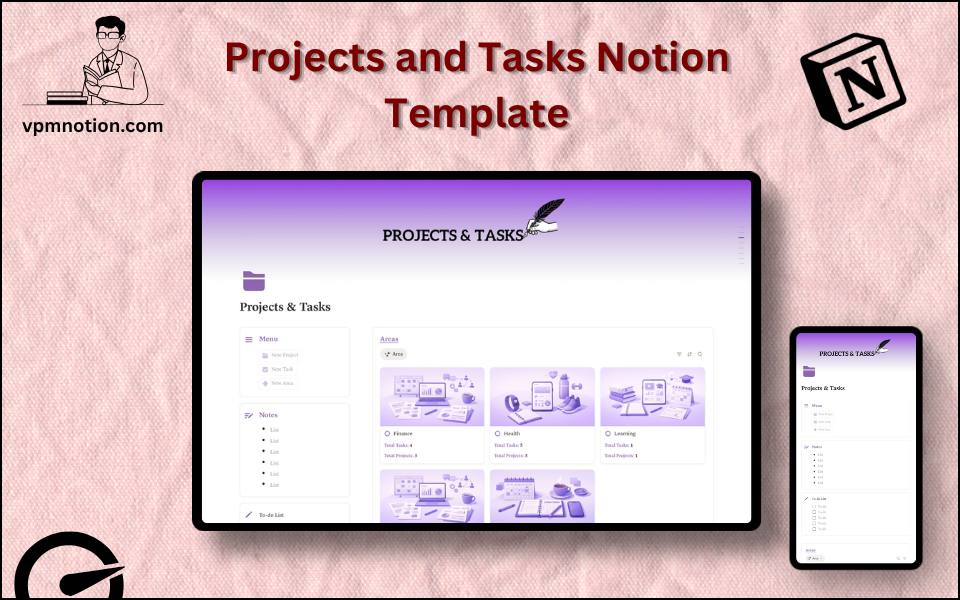
A clean, flexible project and task management system combining an Areas of Responsibility framework with project and task databases. This template helps individuals and small teams manage all of their work — personal projects, professional commitments, and daily tasks — in one organised Notion workspace.
Key Features
- 3 Menu Action Buttons — add new tasks, projects, or area entries quickly
- Notes Section — freeform capture for ideas, decisions, and work-related notes
- To-do List Checklist — quick daily to-do list for immediate tasks
- Areas Database — high-level areas of responsibility or life domains
- Tasks Database — individual tasks linked to projects and areas
- Projects Database — all active and planned projects with status and details
What's Inside
Dashboard Layout
Two-column layout:
- Left column: Menu callout (3 action buttons), Notes callout, To-do List checklist
- Right column: Areas database (inline, top)
Lower two-column layout:
- Left column: Tasks database (inline)
- Right column: Projects database (inline)
Databases Included
Areas Database
- Area name (Career, Health, Finance, Family, Learning, Business, Side Projects, etc.)
- Status (Active, On Hold, Completed)
- Priority
- Notes and goal summary
Tasks Database
- Task name
- Linked project
- Linked area
- Status (Not Started, In Progress, Blocked, Done)
- Priority (High, Medium, Low)
- Due date
- Assignee (for team use)
- Notes
Projects Database
- Project name and description
- Linked area
- Status (Planning, Active, On Hold, Completed, Archived)
- Start date and due date
- Priority
- Key deliverables and notes
Use Cases
- Managing all personal projects (home renovation, learning goals, side business) in one place
- Coordinating professional work projects with tasks assigned to team members
- Building a personal productivity system using an Areas of Responsibility approach
- Tracking project progress from concept to completion with linked tasks
- Replacing scattered to-do lists with a structured, searchable task database
- Planning quarterly personal or professional goals with project-level tracking
Why You'll Love It
- Three-layer structure (Areas → Projects → Tasks) mirrors how real work is organised
- Areas database adds strategic context that most simple task managers lack
- Quick to-do checklist at the left provides immediate daily task capture
- Notes section captures thinking without forcing it into database structure
- Clean two-column layout separates navigation controls from content databases
- Flexible enough for personal productivity and team project coordination
Benefits
- Holistic Organisation — areas, projects, and tasks form a complete work management system
- Context Clarity — linking tasks to projects and areas maintains strategic context
- Flexible Structure — works as a solo productivity system or a team project manager
- Quick Capture — checklist and notes callouts enable fast, frictionless idea and task capture
- Progress Visibility — status tracking across all three levels shows where momentum is building
Who It's For
- Individuals building a personal project management system
- Freelancers managing client projects alongside personal work
- Small teams coordinating work without complex project management software
- Productivity enthusiasts implementing structured personal organisation systems
- Professionals who juggle multiple roles, projects, and responsibilities
How It Works
- Define Your Areas — add your key areas of responsibility to the Areas database
- Create Projects — for each active initiative, create a Project linked to its Area
- Break Down into Tasks — add specific tasks for each project with due dates
- Daily To-do — use the quick checklist for today's most immediate actions
- Capture Notes — use the Notes callout for ideas, decisions, and reflections
- Update Status — keep task and project statuses current for accurate visibility
- Weekly Review — scan all three databases to check what's in progress, blocked, or overdue
- Archive Completed Projects — update status to "Completed" and keep for reference
Frequently Asked Questions
What is the Projects & Tasks Notion template?
Personal & Professional Project Management. A clean, flexible project and task management system combining an Areas of Responsibility framework with project and task databases.
Is the Projects & Tasks template free?
Yes — Projects & Tasks is completely free. Add it to your cart for $0 and duplicate it straight into your own Notion workspace in one click.
Who is Projects & Tasks best for?
It's designed for Individuals building a personal project management system; Freelancers managing client projects alongside personal work; Small teams coordinating work without complex project management software.
What's included in Projects & Tasks?
Key components include Area name (Career, Health, Finance, Family, Learning, Business, Side Projects, etc.), Status (Active, On Hold, Completed), Priority, Notes and goal summary, Task name.
Does Projects & Tasks work on the free Notion plan and on mobile?
Yes. It works on both free and paid Notion plans and is fully usable on desktop, tablet, and the Notion mobile app. Just duplicate it to your workspace and start straight away.
Summary
The Projects & Tasks Notion template is the structured, three-layer productivity system that connects daily tasks to bigger projects and life areas. By organising work across Areas, Projects, and Tasks, it gives individuals and teams the context and clarity to stay focused on what matters — without losing track of what needs to be done. Simple to start, powerful as it grows.
No cost — yours in one click
12 sold
Get it Free- Instant Notion duplication
- Desktop, tablet & mobile
- Beginner-friendly setup
Related templates
Get Projects & Tasks today
The Projects & Tasks Notion template is the structured, three-layer productivity system that connects daily tasks to bigger projects and life areas. By…
Get it Free