 Marketing & Creative
Experiment Tracking System Notion Template
Research, Data Science & Product Experimentation
A structured system for teams and individuals running experiments — whether for machine learning model development, product A/B testing, or scientific research. This template provides a centralised log to track…
One-click duplication · Works on free Notion plans · Lifetime access
Overview
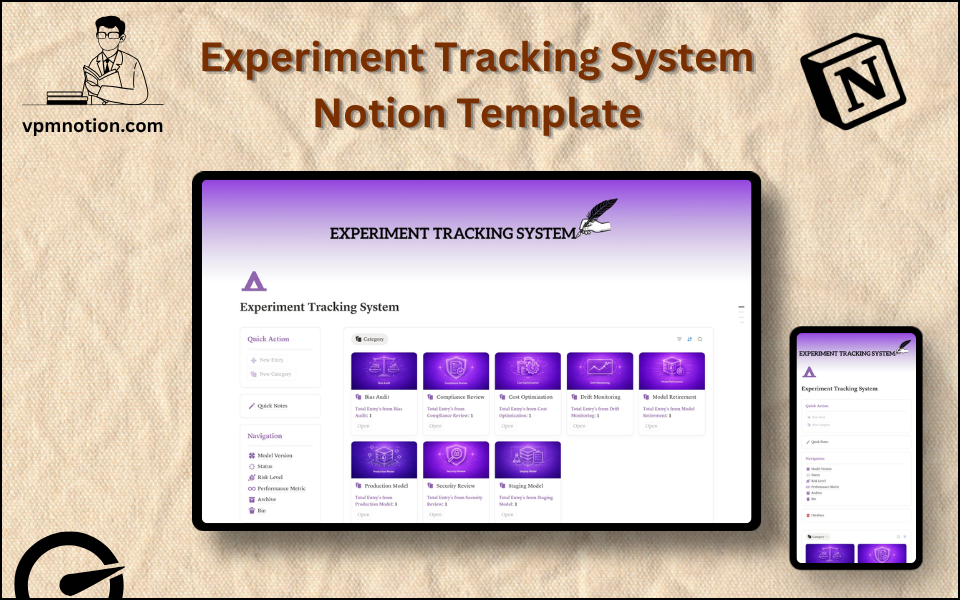
A structured system for teams and individuals running experiments — whether for machine learning model development, product A/B testing, or scientific research. This template provides a centralised log to track hypotheses, model versions, performance metrics, and risk levels across every experiment.
Key Features
- Quick Action Buttons — log a new experiment or update an existing one instantly
- Quick Notes Page — capture observations, hypotheses, and informal experiment ideas
- Navigation Panel with filtered views:
- Model Version
- Status
- Risk Level
- Performance Metric
- Archive
- Bin
- Dashboard Summary Database — inline view of ongoing experiments
- Full Experiment Database — complete log of all experiments with detailed properties
What's Inside
Dashboard Layout
Two-column layout:
- Left column: Quick Action callout, Quick Notes link, Navigation panel with 6 filtered views, Database shortcut
- Right column: Inline summary database with current experiment overview
Databases Included
- Experiment Overview Database — inline summary filtered to active or recent experiments
- Full Experiment Database — all experiments with:
- Experiment name and description
- Hypothesis
- Model version (for ML experiments)
- Status (Planning, Running, Completed, Failed, Archived)
- Risk level (Low, Medium, High)
- Performance metric (Accuracy, Revenue, Engagement, etc.)
- Results and conclusions
- Notes and tags
Navigation Views
- Model Version — tracks iterations of models or experiment configurations
- Status — filters by Planning, Running, Completed, or Failed
- Risk Level — segments experiments by potential downside
- Performance Metric — groups by the KPI being measured
- Archive — completed and concluded experiments
- Bin — cancelled or invalid entries
Use Cases
- Tracking machine learning model training runs and comparing accuracy metrics
- Logging A/B tests for product features with hypothesis, variant, and result
- Managing scientific research experiments with methodology and confidence tracking
- Running growth experiments (pricing, onboarding flows, email campaigns) with risk assessment
- Building a team knowledge base of experiment outcomes to avoid repeating failures
Why You'll Love It
- Structured experiment logging prevents duplicate work and missed learnings
- Risk Level tracking helps teams prioritise safe experiments before high-risk ones
- Model Version filtering is directly relevant for ML/AI teams iterating on models
- Performance Metric view provides a quick benchmark comparison across experiments
- Archive keeps completed experiments accessible for future reference without cluttering active views
- Works equally well for product, data science, and academic research teams
Benefits
- Institutional Memory — all experiment outcomes preserved and searchable
- Risk Awareness — risk level tracking prevents high-impact failures from going unplanned
- Reproducibility — detailed logs allow experiments to be reproduced or referenced
- Collaboration — shared Notion workspace lets teams see what's running and what concluded
- Speed — quick action buttons accelerate experiment logging during fast-paced sprints
Who It's For
- Data Scientists and ML Engineers iterating on model versions
- Product Managers running feature experiments and A/B tests
- Growth Teams testing acquisition and retention strategies
- Academic Researchers tracking research study parameters and results
- R&D Teams in startups and enterprises documenting innovation cycles
How It Works
- Create an Experiment — use Quick Action to log a new experiment with hypothesis
- Set Properties — assign model version, risk level, performance metric, and status
- Run the Experiment — update status to "Running" and log progress in notes
- Record Results — once complete, enter outcomes and update status to "Completed" or "Failed"
- Review by Metric — use Performance Metric view to compare results across experiments
- Risk Review — use Risk Level filter to ensure high-risk experiments have proper safeguards
- Archive Learnings — move concluded experiments to Archive with full notes intact
- Reference Past Work — search archived experiments before starting new ones to avoid duplication
Frequently Asked Questions
What is the Experiment Tracking System Notion template?
Research, Data Science & Product Experimentation. A structured system for teams and individuals running experiments — whether for machine learning model development, product A/B testing, or scientific research.
Is the Experiment Tracking System template free?
Yes — Experiment Tracking System is completely free. Add it to your cart for $0 and duplicate it straight into your own Notion workspace in one click.
Who is Experiment Tracking System best for?
It's designed for Data Scientists and ML Engineers iterating on model versions; Product Managers running feature experiments and A/B tests; Growth Teams testing acquisition and retention strategies.
What's included in Experiment Tracking System?
Key components include Experiment Overview Database, Full Experiment Database, Experiment name and description, Hypothesis, Model version (for ML experiments).
Does Experiment Tracking System work on the free Notion plan and on mobile?
Yes. It works on both free and paid Notion plans and is fully usable on desktop, tablet, and the Notion mobile app. Just duplicate it to your workspace and start straight away.
Summary
The Experiment Tracking System Notion template brings rigour and clarity to the experimentation process. By capturing hypotheses, risk levels, model versions, and performance metrics in a structured database, teams can iterate faster, learn from past results, and build a searchable knowledge base of every experiment ever run. An essential tool for data science teams, product managers, and researchers who take experimentation seriously.
No cost — yours in one click
3 sold
Get it Free- Instant Notion duplication
- Desktop, tablet & mobile
- Beginner-friendly setup
Get Experiment Tracking System today
The Experiment Tracking System Notion template brings rigour and clarity to the experimentation process. By capturing hypotheses, risk levels, model versions…
Get it Free