 Business
Startup Operations Manager Notion Template
Startup Operations & Strategic Execution
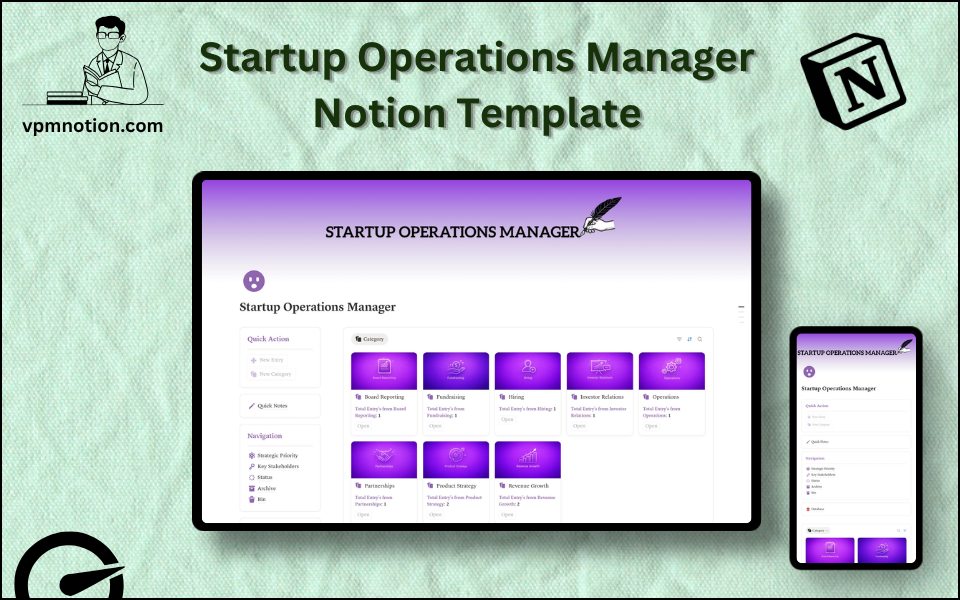
A centralised operations hub for startup founders and ops teams to manage strategic priorities, key stakeholders, and operational tasks. This template brings structure to the organised chaos of early-stage company…
One-click duplication · Works on free Notion plans · Lifetime access
Overview
A centralised operations hub for startup founders and ops teams to manage strategic priorities, key stakeholders, and operational tasks. This template brings structure to the organised chaos of early-stage company building by creating a single source of truth for everything that keeps the business running.
Key Features
- Quick Action Buttons — create new operational tasks or update existing ones fast
- Quick Notes Page — capture meeting outcomes, ideas, and operational memos
- Navigation Panel with filtered views:
- Strategic Priority
- Key Stakeholders
- Status
- Archive
- Bin
- Dashboard Summary Database — inline view of high-priority operational items
- Full Operations Database — complete log of all operational tasks and initiatives
What's Inside
Dashboard Layout
Two-column layout:
- Left column: Quick Action callout, Quick Notes link, Navigation panel with 5 views, Database shortcut
- Right column: Inline summary database showing active and prioritised operational items
Databases Included
- Operations Summary Database — inline view filtered to active high-priority items
- Full Operations Database — all tasks and initiatives with:
- Initiative or task name
- Strategic priority (P0, P1, P2 or Critical, High, Medium, Low)
- Key stakeholders (founders, investors, department heads)
- Status (Not Started, In Progress, Blocked, Completed)
- Due date and notes
- Department or function area
Navigation Views
- Strategic Priority — focuses attention on the most critical operational items
- Key Stakeholders — groups tasks by responsible stakeholder
- Status — filters by current stage of execution
- Archive — completed initiatives and historical decisions
- Bin — removed or deprioritised items
Use Cases
- Managing a startup's weekly operational priorities and company OKRs
- Tracking cross-functional initiatives across product, sales, operations, and finance
- Keeping a record of stakeholder commitments and investor deliverables
- Coordinating team tasks during rapid product launches or pivots
- Building an operational playbook as the company scales and processes are documented
- Preparing for board meetings by reviewing completed and in-progress initiatives
Why You'll Love It
- Strategic Priority filtering keeps founders focused on what moves the needle
- Key Stakeholder tracking ensures every initiative has visible ownership and accountability
- Status tracking prevents tasks from falling through the cracks during rapid growth phases
- Clean two-column layout gives a fast, executive-level overview of operations
- Archive preserves institutional knowledge as the company scales and initiatives evolve
- Flexible enough for any stage of startup — from pre-revenue to Series A
Benefits
- Strategic Focus — priority filtering prevents low-value tasks from consuming executive attention
- Accountability — stakeholder tagging ensures every initiative has a named owner
- Operational Clarity — single dashboard replaces scattered Slack threads and spreadsheets
- Scalability — grows with the startup from 3 people to 50+
- Decision History — archive provides a record of operational decisions and pivots
Who It's For
- Startup Founders building operational structure from the ground up
- COOs and Operations Leads at early-stage companies
- General Managers coordinating multiple functions
- Startup accelerator participants building systems for Demo Day readiness
- Small business owners who need a lightweight operations management system
How It Works
- Log an Initiative — use Quick Action to create a new operational task or project
- Set Strategic Priority — assign priority level based on company focus areas
- Assign Stakeholders — tag the founder, team lead, or investor responsible
- Track Status — update as work progresses from Not Started through to Completed
- Review by Priority — use Strategic Priority view in weekly leadership meetings
- Flag Blockers — update blocked items and document the blocker in notes
- Use Quick Notes — capture decisions and action items from leadership meetings
- Archive Completed Work — close out finished initiatives and move to Archive
- Quarterly Review — use archived items to build a retrospective of the quarter's work
Frequently Asked Questions
What is the Startup Operations Manager Notion template?
Startup Operations & Strategic Execution. A centralised operations hub for startup founders and ops teams to manage strategic priorities, key stakeholders, and operational tasks.
How much does Startup Operations Manager cost?
Startup Operations Manager is a premium Notion template available for a one-time payment of $12 — no subscription. After checkout you can duplicate it into your Notion workspace and own it forever.
Who is Startup Operations Manager best for?
It's designed for Startup Founders building operational structure from the ground up; COOs and Operations Leads at early-stage companies; General Managers coordinating multiple functions.
What's included in Startup Operations Manager?
Key components include Operations Summary Database, Full Operations Database, Initiative or task name, Strategic priority (P0, P1, P2 or Critical, High, Medium, Low), Key stakeholders (founders, investors, department heads).
Does Startup Operations Manager work on the free Notion plan and on mobile?
Yes. It works on both free and paid Notion plans and is fully usable on desktop, tablet, and the Notion mobile app. Just duplicate it to your workspace and start straight away.
Summary
The Startup Operations Manager Notion template gives early-stage companies the operational backbone they need to execute with clarity and speed. By centralising priorities, stakeholders, and statuses in one workspace, founders and ops teams can stop relying on scattered tools and start running the business with the discipline of a much larger organisation. An essential template for any startup serious about operational excellence.
One-time payment · lifetime access
12 sold
Get Template — $12- Instant Notion duplication
- Desktop, tablet & mobile
- Beginner-friendly setup
Related templates
Get Startup Operations Manager today
The Startup Operations Manager Notion template gives early-stage companies the operational backbone they need to execute with clarity and speed. By…
Get Template — $12