 Productivity
AI Prompt Manager Notion Template
AI Prompt Library & Management
A structured AI prompt management system for professionals, teams, and AI power users who want to build, organise, version, and evaluate their library of prompts for large language models (ChatGPT, Claude, Gemini, and…
One-click duplication · Works on free Notion plans · Lifetime access
Overview
A structured AI prompt management system for professionals, teams, and AI power users who want to build, organise, version, and evaluate their library of prompts for large language models (ChatGPT, Claude, Gemini, and others). This template turns ad-hoc prompt creation into a strategic, reusable knowledge asset.
Key Features
- Quick Action Buttons — add new prompts or update existing ones quickly
- Quick Notes Page — prompt ideas, testing observations, and AI strategy notes
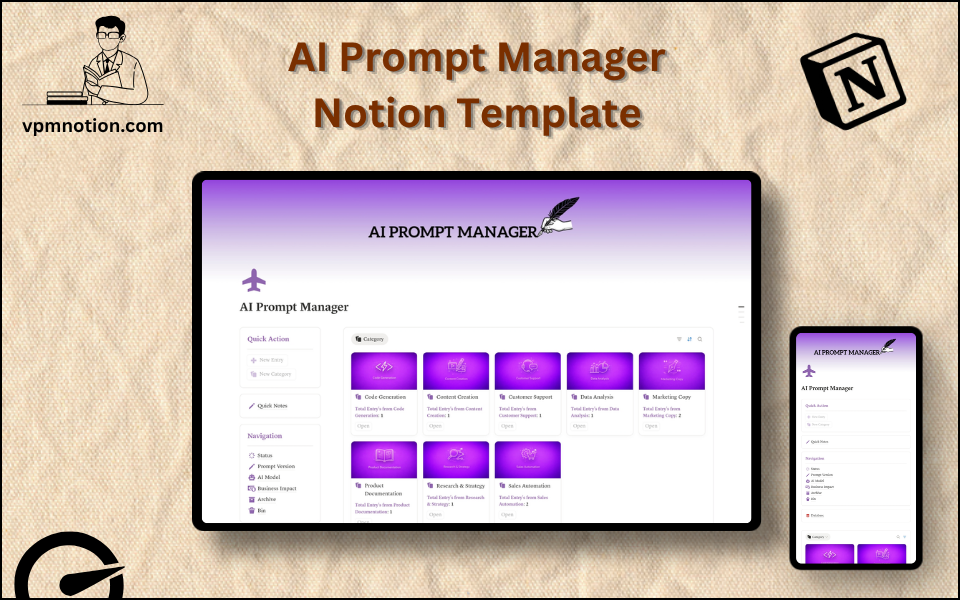
- Navigation Panel with filtered views:
- Status
- Prompt Version
- AI Model
- Business Impact
- Archive
- Bin
- Dashboard Summary Database — inline view of active and high-impact prompts
- Full Prompt Library Database — complete record of all prompts with version history and ratings
What's Inside
Dashboard Layout
Two-column layout:
- Left column: Quick Action callout, Quick Notes link, Navigation panel with 6 views, Database shortcut
- Right column: Inline summary database with active and high-impact prompts
Databases Included
- Prompt Overview Database — active prompts filtered by status and impact
- Full Prompt Library Database — all prompts with:
- Prompt name and description
- Prompt text (full prompt content)
- AI model (ChatGPT-4, Claude Sonnet, Gemini, Llama, Mistral, etc.)
- Prompt version (v1.0, v1.1, v2.0, etc.)
- Status (Draft, Testing, Active, Optimised, Deprecated)
- Business impact (Low, Medium, High, Critical)
- Use case / category (Writing, Analysis, Coding, Marketing, Research, etc.)
- Notes and test results
- Tags and related prompts
Navigation Views
- Status — filters by prompt development lifecycle stage
- Prompt Version — tracks version history for iterative prompt improvement
- AI Model — segments library by the model each prompt is designed for
- Business Impact — surfaces highest-value prompts for priority attention
- Archive — deprecated or replaced prompts preserved for reference
- Bin — deleted or invalid entries
Use Cases
- Building a personal prompt library for daily AI-assisted work (writing, coding, analysis)
- Managing a team's shared prompt library for consistent AI output quality
- Tracking prompt performance across different AI models for model selection decisions
- Iterating and versioning prompts to continuously improve output quality
- Documenting AI workflows and prompt chains for process automation
- Building a knowledge base of high-impact prompts for onboarding new team members to AI tools
Why You'll Love It
- Prompt Version tracking allows teams to iterate and improve prompts systematically
- AI Model filtering supports multi-model environments (ChatGPT, Claude, Gemini, Llama, etc.)
- Business Impact view prioritises prompts by their contribution to real business outcomes
- Status tracking manages prompts from draft through tested, optimised, and production-ready
- Archive preserves deprecated or replaced prompts for reference without polluting the active library
- The only template specifically designed for AI prompt lifecycle management
Benefits
- Reusability — saves time by reusing tested, optimised prompts instead of rewriting from scratch
- Version Control — prompt history prevents losing improvements made through iteration
- Model Intelligence — AI model tracking informs which prompts perform best on which models
- Business Value — impact ratings focus attention on the prompts that drive real outcomes
- Team Alignment — shared prompt library ensures consistent AI usage across the team
Who It's For
- AI Power Users who use LLMs daily and want to build a systematic prompt library
- Marketing and Content Teams using AI for writing, copy, and content generation
- Developers and Engineers managing coding and debugging prompts
- Consultants and Analysts using AI for research, analysis, and reporting
- Business Teams automating workflows with AI and needing reusable prompt assets
- AI researchers and enthusiasts systematically studying prompt engineering
How It Works
- Add a New Prompt — use Quick Action to create a new prompt entry with full text
- Set Properties — assign AI model, use case, version, status, and business impact
- Test the Prompt — run the prompt and record results and observations in notes
- Update Status — move from Draft → Testing → Active as prompt quality is validated
- Version Control — when making significant improvements, create a new version (v1.0 → v2.0)
- Review by Impact — use Business Impact view to focus on your highest-value prompts
- Share with Team — use the Notion workspace to share approved, active prompts with colleagues
- Archive Deprecated Prompts — when a prompt is replaced by a better version, archive the old one
Frequently Asked Questions
What is the AI Prompt Manager Notion template?
AI Prompt Library & Management. A structured AI prompt management system for professionals, teams, and AI power users who want to build, organise, version, and evaluate their library of prompts for large language models (ChatGPT, Claude, Gemini, and others).
Is the AI Prompt Manager template free?
Yes — AI Prompt Manager is completely free. Add it to your cart for $0 and duplicate it straight into your own Notion workspace in one click.
Who is AI Prompt Manager best for?
It's designed for AI Power Users who use LLMs daily and want to build a systematic prompt library; Marketing and Content Teams using AI for writing, copy, and content generation; Developers and Engineers managing coding and debugging prompts.
What's included in AI Prompt Manager?
Key components include Prompt Overview Database, Full Prompt Library Database, Prompt name and description, Prompt text (full prompt content), AI model (ChatGPT-4, Claude Sonnet, Gemini, Llama, Mistral, etc.).
Does AI Prompt Manager work on the free Notion plan and on mobile?
Yes. It works on both free and paid Notion plans and is fully usable on desktop, tablet, and the Notion mobile app. Just duplicate it to your workspace and start straight away.
Summary
The AI Prompt Manager Notion template is the strategic prompt library that every AI-first professional and team needs. By bringing version control, model tracking, business impact ratings, and status management to prompt development, it transforms prompt engineering from an informal art into a systematic, scalable practice. Build your AI toolkit once — and reuse it forever.
No cost — yours in one click
43 sold
Get it Free- Instant Notion duplication
- Desktop, tablet & mobile
- Beginner-friendly setup
Related templates
Get AI Prompt Manager today
The AI Prompt Manager Notion template is the strategic prompt library that every AI-first professional and team needs. By bringing version control, model…
Get it Free