 Business
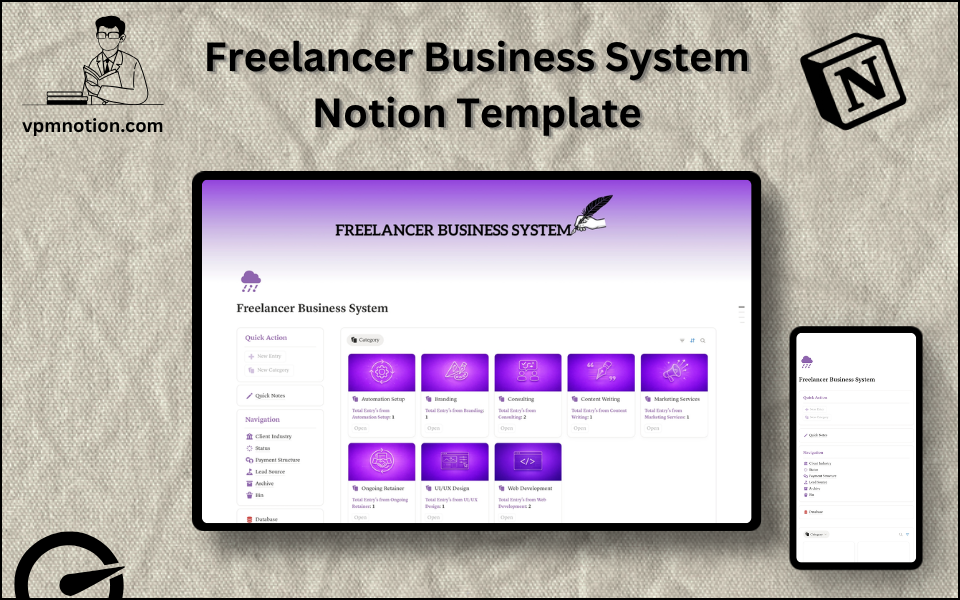
Freelancer Business System Notion Template
Freelance Business Management & Client Operations
An all-in-one operating system for freelancers who need to manage clients, track projects, monitor payments, and organise their business — without juggling multiple apps. Built for solo operators running a professional…
One-click duplication · Works on free Notion plans · Lifetime access
Overview
An all-in-one operating system for freelancers who need to manage clients, track projects, monitor payments, and organise their business — without juggling multiple apps. Built for solo operators running a professional freelance practice.
Key Features
- Quick Action Buttons — add new clients or projects with a single click
- Quick Notes Page — a scratchpad for client calls, ideas, and follow-up actions
- Navigation Panel with filtered views:
- Client Industry
- Status
- Payment Structure
- Lead Source
- Archive
- Bin
- Dashboard Summary Database — inline overview of active clients and projects
- Full Business Database — complete client and project records
What's Inside
Dashboard Layout
Two-column layout:
- Left column: Quick Action callout, Quick Notes link, Navigation panel with 6 filtered views, Database shortcut
- Right column: Inline summary database for a fast business snapshot
Databases Included
- Client/Project Overview Database — status, industry, payment structure, lead source for each engagement
- Full Business Database — detailed records with:
- Client name and contact
- Project name and scope
- Status (Active, In Review, Completed, On Hold)
- Payment structure (Hourly, Project-based, Retainer, Milestone)
- Lead source (Referral, Social Media, Cold Outreach, Platform, etc.)
- Client industry (Tech, Marketing, Design, Finance, etc.)
- Notes and deadlines
Navigation Views
- Client Industry — segments clients by sector
- Status — filters projects by Active, Completed, On Hold, etc.
- Payment Structure — groups by billing model
- Lead Source — shows which acquisition channels are working
- Archive — past clients and completed projects
- Bin — removed or irrelevant entries
Use Cases
- Tracking all active client projects and their deadlines in one dashboard
- Managing invoicing and payment milestones for different billing structures
- Reviewing which lead sources produce the highest-value clients
- Keeping a CRM-style record of all past clients for repeat business outreach
- Planning workload capacity by reviewing active vs. upcoming projects
Why You'll Love It
- Covers every major aspect of freelance operations: clients, projects, payments, and leads
- Payment Structure filter helps manage retainer, project-based, and hourly clients separately
- Lead Source tracking shows which channels bring the best clients
- Client Industry view makes it easy to see specialisations and portfolio focus
- Archive and Bin views maintain a clean active workspace while preserving history
- Built specifically for independent freelancers — not adapted from a corporate tool
Benefits
- Business Clarity — full picture of all client work, revenue sources, and pipeline
- Payment Tracking — never miss an invoice with payment structure visibility
- Lead Intelligence — understand where your best clients come from
- Professional Organisation — run your freelance business like a company
- Lightweight — no complex software needed; fully Notion-native
Who It's For
- Freelance designers, developers, writers, and marketers
- Consultants managing multiple client engagements simultaneously
- Creative professionals building a client-based business
- Side-hustle freelancers transitioning to full-time independent work
- Agency solo operators managing their own book of business
How It Works
- Add a New Client — use Quick Action to create a client/project record
- Set Properties — assign industry, status, payment structure, and lead source
- Track Progress — update project status as work progresses from kickoff to delivery
- Log Notes — use the Quick Notes page to capture meeting highlights and action items
- Monitor Leads — track which channels are bringing in new enquiries via Lead Source view
- Review by Industry — use Client Industry view to see portfolio spread
- Archive Completed Work — move finished projects to Archive to keep active view clean
- Weekly Review — use dashboard summary to assess workload and upcoming deadlines
Frequently Asked Questions
What is the Freelancer Business System Notion template?
Freelance Business Management & Client Operations. An all-in-one operating system for freelancers who need to manage clients, track projects, monitor payments, and organise their business — without juggling multiple apps.
How much does Freelancer Business System cost?
Freelancer Business System is a premium Notion template available for a one-time payment of $12 — no subscription. After checkout you can duplicate it into your Notion workspace and own it forever.
Who is Freelancer Business System best for?
It's designed for Freelance designers, developers, writers, and marketers; Consultants managing multiple client engagements simultaneously; Creative professionals building a client-based business.
What's included in Freelancer Business System?
Key components include Client/Project Overview Database, Full Business Database, Client name and contact, Project name and scope, Status (Active, In Review, Completed, On Hold).
Does Freelancer Business System work on the free Notion plan and on mobile?
Yes. It works on both free and paid Notion plans and is fully usable on desktop, tablet, and the Notion mobile app. Just duplicate it to your workspace and start straight away.
Summary
The Freelancer Business System Notion template is the operational backbone every independent professional needs. It organises clients, tracks projects, monitors payment structures, and records lead sources — giving freelancers full visibility into their business without complexity. Whether managing five clients or fifty, this template keeps a freelance practice running smoothly and professionally inside a single Notion workspace.
One-time payment · lifetime access
Get Template — $12- Instant Notion duplication
- Desktop, tablet & mobile
- Beginner-friendly setup
Related templates
Get Freelancer Business System today
The Freelancer Business System Notion template is the operational backbone every independent professional needs. It organises clients, tracks projects…
Get Template — $12