 Business
Business Operations Manager Notion Template
Business Operations, Contracts & Vendor Management
A comprehensive operations management system for businesses that need to track departmental activities, contracts, vendor relationships, and payment schedules in one centralised workspace. This template brings order to…
One-click duplication · Works on free Notion plans · Lifetime access
Overview
A comprehensive operations management system for businesses that need to track departmental activities, contracts, vendor relationships, and payment schedules in one centralised workspace. This template brings order to the operational complexity of running a business at scale.
Key Features
- Quick Action Buttons — create new operational records or contracts instantly
- Quick Notes Page — space for business decisions, vendor communications, and operational memos
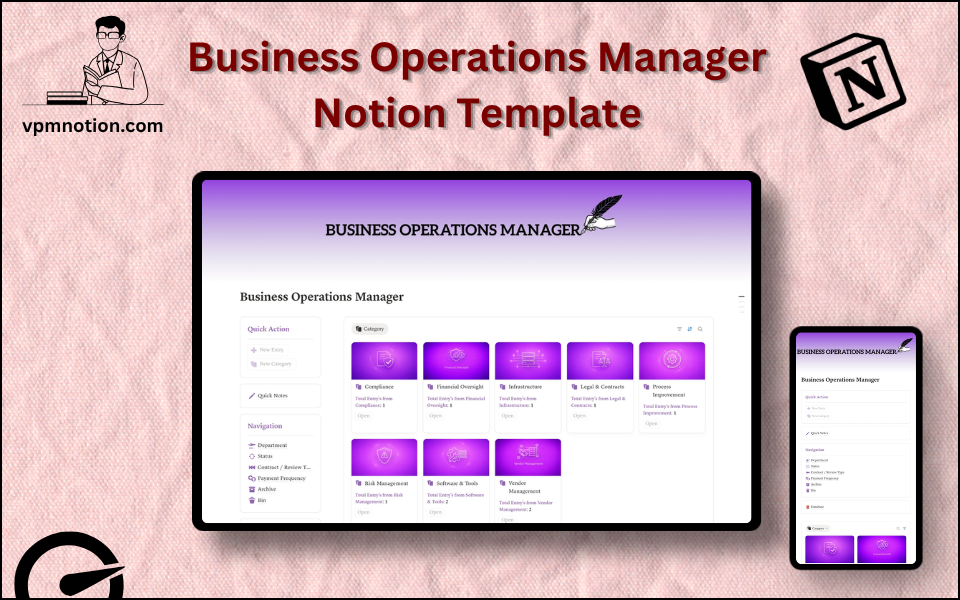
- Navigation Panel with filtered views:
- Department
- Status
- Contract / Review Type
- Payment Frequency
- Archive
- Bin
- Dashboard Summary Database — inline overview of active operational items
- Full Operations Database — complete record of all business operations, contracts, and vendor agreements
What's Inside
Dashboard Layout
Two-column layout:
- Left column: Quick Action callout, Quick Notes link, Navigation panel with 6 views, Database shortcut
- Right column: Inline summary database with current high-priority operational items
Databases Included
- Operations Summary Database — inline view of active contracts and tasks by department
- Full Business Database — all records with:
- Task or contract name
- Department (Finance, HR, Legal, Operations, Sales, Marketing, etc.)
- Status (Active, In Review, Expired, Completed, Pending)
- Contract/Review type (Vendor Contract, NDA, SLA, Performance Review, Partnership Agreement)
- Payment frequency (One-time, Monthly, Quarterly, Annual)
- Responsible owner
- Renewal dates and notes
Navigation Views
- Department — segments operational records by business unit
- Status — filters by active, pending, expired, or completed
- Contract / Review Type — separates different types of business agreements
- Payment Frequency — organises by billing cycle for cash flow management
- Archive — expired or completed contracts and operational records
- Bin — removed or duplicate entries
Use Cases
- Tracking all vendor and supplier contracts with renewal dates and payment terms
- Managing multi-department operational tasks and cross-functional projects
- Monitoring SLA compliance for external service providers
- Planning budget allocations based on payment frequency across all contracts
- Preparing for legal or compliance audits with a complete contract repository
- Coordinating operational tasks across departments during mergers, expansions, or restructures
Why You'll Love It
- Contract/Review Type filtering lets operations teams quickly separate NDAs, SLAs, vendor contracts, and performance reviews
- Payment Frequency view (monthly, quarterly, annual) supports cash flow planning and budget forecasting
- Department filtering enables cross-functional visibility while keeping each team's data focused
- Status tracking prevents contracts or operational tasks from expiring unnoticed
- Archive preserves contract history without cluttering the active operational view
- Works as both an internal operations tracker and a light vendor management system
Benefits
- Contract Visibility — never miss a renewal date or contract expiry again
- Cash Flow Planning — payment frequency data enables accurate financial forecasting
- Cross-Functional Order — department filtering keeps each team's operations visible without noise
- Compliance Ready — complete contract records support audit and legal review processes
- Scalable — works for a 10-person business up to a multi-department company
Who It's For
- COOs and Operations Managers overseeing company-wide processes
- Business Owners managing vendor relationships and operational commitments
- Legal and Compliance Teams tracking contract statuses and review cycles
- Finance Teams monitoring payment schedules and operational expenditure
- HR Teams managing employment contracts and review cycles
How It Works
- Add an Operational Item — use Quick Action to log a new contract, task, or review
- Assign Properties — set department, contract type, status, and payment frequency
- Track Status — monitor whether contracts are active, under review, or approaching expiry
- Set Renewal Reminders — use due dates to flag contracts approaching renewal
- Review by Payment Frequency — use this view for monthly cash flow and budget planning
- Department Review — use Department view for team-specific operational audits
- Log Notes — capture vendor communications and negotiation details in Quick Notes
- Archive Expired Contracts — move concluded or expired records to Archive for reference
- Quarterly Ops Review — use the full database to prepare for leadership operations reviews
Frequently Asked Questions
What is the Business Operations Manager Notion template?
Business Operations, Contracts & Vendor Management. A comprehensive operations management system for businesses that need to track departmental activities, contracts, vendor relationships, and payment schedules in one centralised workspace.
How much does Business Operations Manager cost?
Business Operations Manager is a premium Notion template available for a one-time payment of $5 — no subscription. After checkout you can duplicate it into your Notion workspace and own it forever.
Who is Business Operations Manager best for?
It's designed for COOs and Operations Managers overseeing company-wide processes; Business Owners managing vendor relationships and operational commitments; Legal and Compliance Teams tracking contract statuses and review cycles.
What's included in Business Operations Manager?
Key components include Operations Summary Database, Full Business Database, Task or contract name, Department (Finance, HR, Legal, Operations, Sales, Marketing, etc.), Status (Active, In Review, Expired, Completed, Pending).
Does Business Operations Manager work on the free Notion plan and on mobile?
Yes. It works on both free and paid Notion plans and is fully usable on desktop, tablet, and the Notion mobile app. Just duplicate it to your workspace and start straight away.
Summary
The Business Operations Manager Notion template is the centralised control room for running a business efficiently. By bringing contracts, vendor agreements, payment schedules, and departmental tasks into one workspace, it eliminates the operational blind spots that come from managing everything in spreadsheets and email threads. A powerful, flexible tool for operations professionals who need visibility, structure, and control.
One-time payment · lifetime access
2 sold
Get Template — $5- Instant Notion duplication
- Desktop, tablet & mobile
- Beginner-friendly setup
Related templates
Get Business Operations Manager today
The Business Operations Manager Notion template is the centralised control room for running a business efficiently. By bringing contracts, vendor agreements…
Get Template — $5