 Productivity
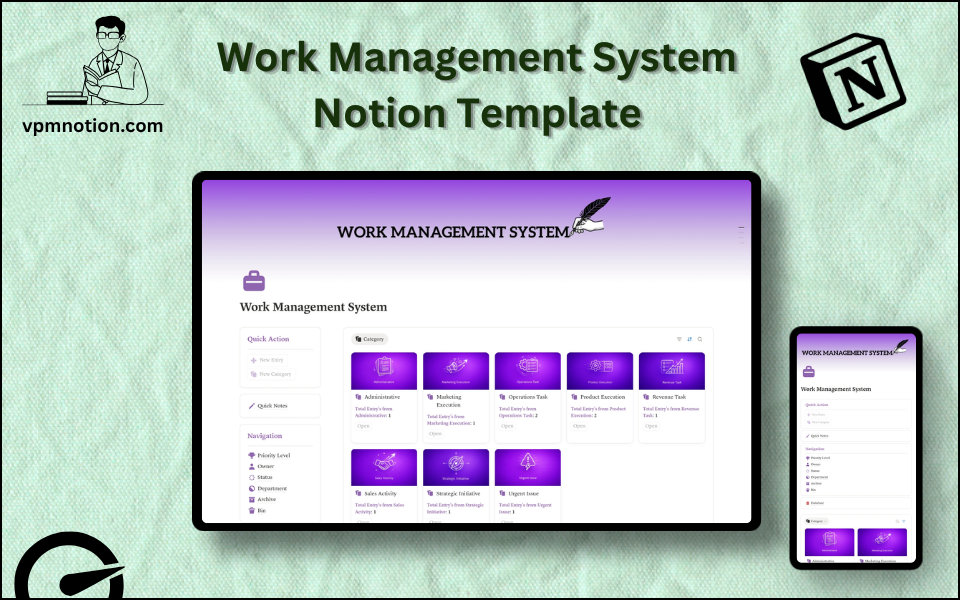
Work Management System Notion Template
Task & Work Management
A versatile, team-friendly work management system for tracking tasks, assigning owners, managing priorities, and organising work across departments — all in one Notion workspace. This template works as both a personal…
One-click duplication · Works on free Notion plans · Lifetime access
Overview
A versatile, team-friendly work management system for tracking tasks, assigning owners, managing priorities, and organising work across departments — all in one Notion workspace. This template works as both a personal task manager and a team-wide project coordination system.
Key Features
- Quick Action Buttons — create new tasks or work items instantly
- Quick Notes Page — capture meeting action items, ideas, and work-related notes
- Navigation Panel with filtered views:
- Priority Level
- Owner
- Status
- Department
- Archive
- Bin
- Dashboard Summary Database — inline view of active and high-priority work items
- Full Work Database — complete record of all tasks and work items
What's Inside
Dashboard Layout
Two-column layout:
- Left column: Quick Action callout, Quick Notes link, Navigation panel with 6 views, Database shortcut
- Right column: Inline summary database showing active work items
Databases Included
- Work Summary Database — inline view filtered to active or high-priority items
- Full Work Database — all tasks and work items with:
- Task or work item name
- Priority level (Critical, High, Medium, Low)
- Owner / assignee
- Status (Not Started, In Progress, Blocked, In Review, Completed)
- Department (Engineering, Marketing, Sales, Operations, Finance, etc.)
- Due date
- Notes and dependencies
Navigation Views
- Priority Level — surfaces most critical tasks first
- Owner — allows each team member to see their assigned tasks
- Status — filters by stage of completion
- Department — shows all work items for a specific team or function
- Archive — completed work preserved for historical reference
- Bin — deleted or irrelevant entries
Use Cases
- Managing a team's weekly or sprint-based task list
- Coordinating cross-departmental projects with clear ownership
- Running personal productivity systems for individuals
- Tracking delegated tasks and following up on progress
- Replacing scattered to-do lists, sticky notes, and email chains with one central system
- Planning workload and capacity by reviewing open tasks per owner
Why You'll Love It
- Priority Level filtering ensures the most important work gets attention first
- Owner assignment creates individual accountability for every task
- Department view enables cross-functional visibility without mixing team-specific work
- Status tracking shows what's in progress, blocked, or complete at any given time
- Works as a solo personal productivity tool or a shared team work management system
- Clean two-column layout keeps work items visible without overwhelming detail
Benefits
- Focus — priority filtering means the most important work is always visible
- Ownership — every task has a named owner, eliminating ambiguity
- Visibility — cross-department view gives managers a full picture of team workload
- Flexibility — adapts to any work style or team structure
- Simplicity — no complex project management setup required
Who It's For
- Teams of any size looking for a lightweight project coordination tool
- Individuals building a personal task management system in Notion
- Managers tracking delegated work and following up on progress
- Remote teams needing a shared, always-visible task list
- Startups and small businesses that don't need full project management software
How It Works
- Add a Work Item — use Quick Action to create a task with name and description
- Set Priority and Owner — assign the appropriate priority level and team member
- Assign Department — tag the relevant department for cross-functional visibility
- Track Status — update as work progresses from Not Started through to Completed
- Use Owner View — team members filter by their name to see their personal task list
- Priority Review — use Priority Level view in daily standups or planning meetings
- Block Tracking — mark blocked tasks and log the blocker in notes
- Archive Completed Work — regularly move completed items to Archive to maintain a clean active view
Frequently Asked Questions
What is the Work Management System Notion template?
Task & Work Management. A versatile, team-friendly work management system for tracking tasks, assigning owners, managing priorities, and organising work across departments — all in one Notion workspace.
Is the Work Management System template free?
Yes — Work Management System is completely free. Add it to your cart for $0 and duplicate it straight into your own Notion workspace in one click.
Who is Work Management System best for?
It's designed for Teams of any size looking for a lightweight project coordination tool; Individuals building a personal task management system in Notion; Managers tracking delegated work and following up on progress.
What's included in Work Management System?
Key components include Work Summary Database, Full Work Database, Task or work item name, Priority level (Critical, High, Medium, Low), Owner / assignee.
Does Work Management System work on the free Notion plan and on mobile?
Yes. It works on both free and paid Notion plans and is fully usable on desktop, tablet, and the Notion mobile app. Just duplicate it to your workspace and start straight away.
Summary
The Work Management System Notion template is the no-fuss task and project management tool that works for individuals and teams alike. With priority filtering, ownership assignment, and department-level visibility, it provides everything needed to stay organised, focused, and accountable — without the bloat of complex project management platforms. Start using it in minutes, customise it as you grow.
No cost — yours in one click
16 sold
Get it Free- Instant Notion duplication
- Desktop, tablet & mobile
- Beginner-friendly setup
Related templates
Get Work Management System today
The Work Management System Notion template is the no-fuss task and project management tool that works for individuals and teams alike. With priority filtering…
Get it Free