 Marketing & Creative
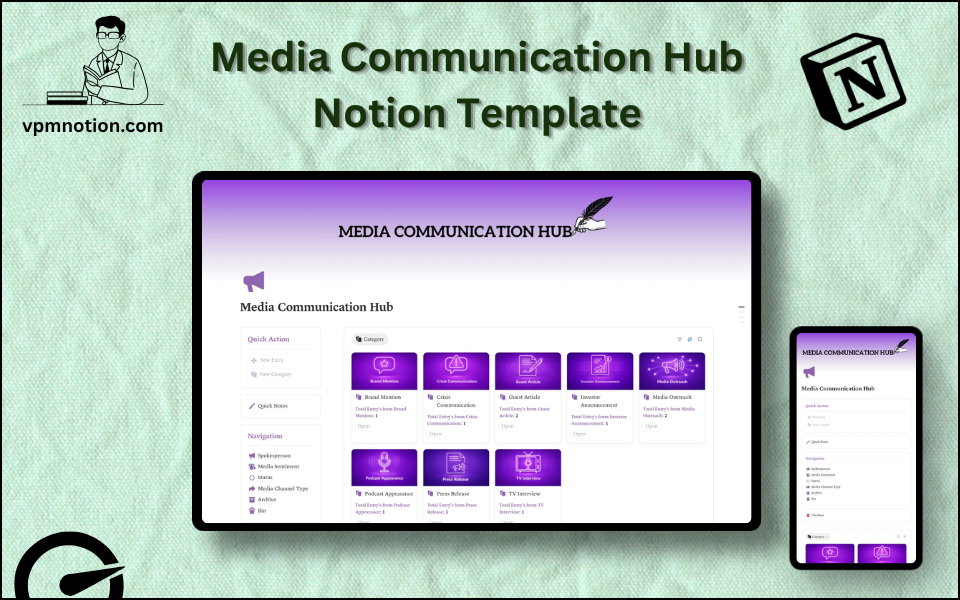
Media Communication Hub Notion Template
Public Relations & Media Communications Management
A structured communications management system for PR professionals, communications teams, and corporate spokespeople to track media interactions, monitor sentiment, manage press activities, and maintain oversight of all…
One-click duplication · Works on free Notion plans · Lifetime access
Overview
A structured communications management system for PR professionals, communications teams, and corporate spokespeople to track media interactions, monitor sentiment, manage press activities, and maintain oversight of all media-facing communications — in one organised Notion workspace.
Key Features
- Quick Action Buttons — log new media interactions or press items instantly
- Quick Notes Page — spokesperson briefing notes, press release drafts, and communication strategy memos
- Navigation Panel with filtered views:
- Spokesperson
- Media Sentiment
- Status
- Media Channel Type
- Archive
- Bin
- Dashboard Summary Database — inline overview of active media communications
- Full Communications Database — complete record of all media interactions and PR activities
What's Inside
Dashboard Layout
Two-column layout:
- Left column: Quick Action callout, Quick Notes link, Navigation panel with 6 views, Database shortcut
- Right column: Inline summary database with active media interactions
Databases Included
- Media Overview Database — active communications items filtered by status
- Full Communications Database — all PR and media records with:
- Media item or interaction name
- Spokesperson (CEO, CMO, PR Manager, Company Representative)
- Media channel type (TV, Print, Radio, Podcast, Online News, Social Media, Press Conference)
- Media sentiment (Positive, Neutral, Negative, Mixed)
- Status (Draft, Pending, Scheduled, Published, Cancelled)
- Publication / outlet name
- Date of coverage or scheduled date
- Journalist or interviewer name and contact
- Key messages and talking points
- Notes and follow-up actions
Navigation Views
- Spokesperson — shows all media interactions assigned to each spokesperson
- Media Sentiment — surfaces negative coverage for urgent reputation management response
- Status — filters by stage of the communications lifecycle
- Media Channel Type — groups interactions by press type for channel-specific reviews
- Archive — historical media records for annual PR reporting
- Bin — invalid or duplicate entries
Use Cases
- Tracking all media coverage (earned, owned, and paid) in a single communications log
- Managing spokesperson assignments and briefings across multiple media appearances
- Monitoring press sentiment after product launches, crises, or major announcements
- Preparing for press releases with structured drafting and approval workflows
- Building a media contact directory linked to ongoing coverage and relationships
- Compiling quarterly PR reports using archived media records and sentiment data
Why You'll Love It
- Media Sentiment tracking monitors the tone of press coverage (Positive, Neutral, Negative)
- Spokesperson filtering assigns and tracks accountability for specific media appearances or statements
- Media Channel Type view segments interactions by TV, print, podcast, online, social, etc.
- Status tracking manages the lifecycle of press releases, interviews, and media requests
- Archive preserves a complete media history for PR audits and annual communications reviews
- Supports proactive reputation management by flagging negative sentiment items for urgent attention
Benefits
- Reputation Awareness — sentiment tracking enables fast response to negative media coverage
- Spokesperson Accountability — clear assignment prevents unauthorised or inconsistent messaging
- Channel Strategy — media type segmentation shows which channels deliver most coverage
- PR Record — full archive of all media interactions supports annual reporting
- Crisis Management — centralised communications hub enables coordinated responses to media crises
Who It's For
- PR Managers overseeing all external media communications
- Corporate Communications Teams managing brand reputation across channels
- CEOs and Executives coordinating their own media presence and spokesperson activities
- Startup Founders building their early PR strategy and media relationships
- Marketing Teams with PR responsibilities at smaller organisations
How It Works
- Log a Media Item — use Quick Action to create a record for each press release, interview, or coverage item
- Assign Spokesperson — tag the team member responsible for this communication
- Set Channel and Status — assign media channel type and current status
- Add Key Messages — record talking points and approved messaging in the notes field
- Monitor Sentiment — update sentiment rating as coverage appears
- Flag Negative Sentiment — use the Sentiment view to identify negative coverage for urgent response
- Review by Channel — use Media Channel Type view for channel-specific PR planning
- Archive Completed Coverage — move published and concluded items to Archive for reporting
- Compile PR Reports — use archived data for monthly, quarterly, or annual communications reporting
Frequently Asked Questions
What is the Media Communication Hub Notion template?
Public Relations & Media Communications Management. A structured communications management system for PR professionals, communications teams, and corporate spokespeople to track media interactions, monitor sentiment, manage press activities, and maintain oversight of all media-facing communications — in one organised Notion workspace.
Is the Media Communication Hub template free?
Yes — Media Communication Hub is completely free. Add it to your cart for $0 and duplicate it straight into your own Notion workspace in one click.
Who is Media Communication Hub best for?
It's designed for PR Managers overseeing all external media communications; Corporate Communications Teams managing brand reputation across channels; CEOs and Executives coordinating their own media presence and spokesperson activities.
What's included in Media Communication Hub?
Key components include Media Overview Database, Full Communications Database, Media item or interaction name, Spokesperson (CEO, CMO, PR Manager, Company Representative), Media channel type (TV, Print, Radio, Podcast, Online News, Social Media, Press Conference).
Does Media Communication Hub work on the free Notion plan and on mobile?
Yes. It works on both free and paid Notion plans and is fully usable on desktop, tablet, and the Notion mobile app. Just duplicate it to your workspace and start straight away.
Summary
The Media Communication Hub Notion template is the PR and communications command centre for organisations that take their public image seriously. With spokesperson tracking, sentiment monitoring, channel segmentation, and a complete media archive, it gives communications teams the visibility and structure to manage their media relationships proactively and protect their brand reputation effectively.
No cost — yours in one click
3 sold
Get it Free- Instant Notion duplication
- Desktop, tablet & mobile
- Beginner-friendly setup
Get Media Communication Hub today
The Media Communication Hub Notion template is the PR and communications command centre for organisations that take their public image seriously. With…
Get it Free