 Marketing & Creative
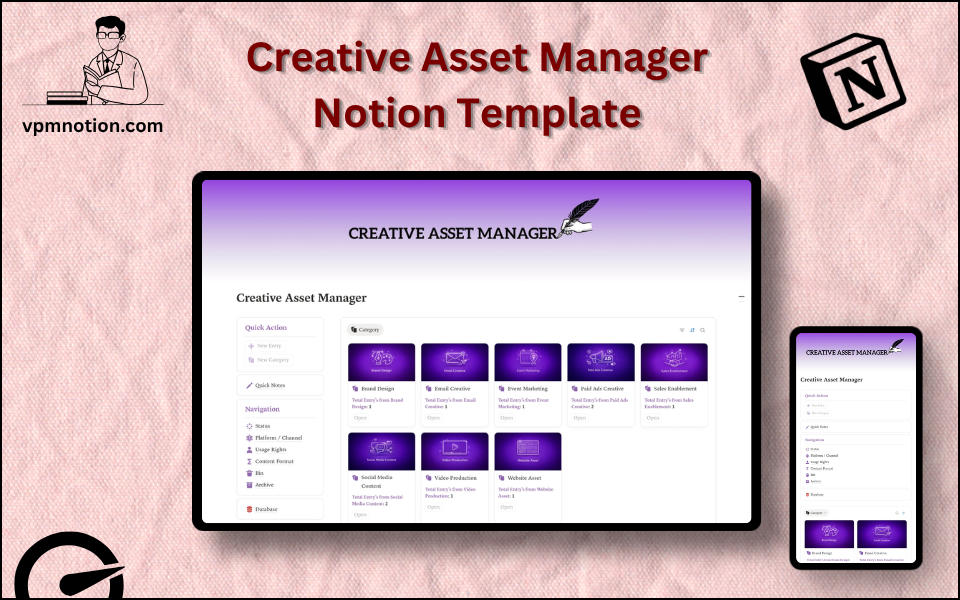
Creative Asset Manager Notion Template
Digital Asset Management & Creative Content Organisation
A structured system for creative teams and content professionals to manage their digital assets — including designs, videos, copy, images, and brand files. This template tracks every asset's status, platform, usage…
One-click duplication · Works on free Notion plans · Lifetime access
Overview
A structured system for creative teams and content professionals to manage their digital assets — including designs, videos, copy, images, and brand files. This template tracks every asset's status, platform, usage rights, and content format in one searchable, filterable Notion database.
Key Features
- Quick Action Buttons — add new assets or update existing records quickly
- Quick Notes Page — space for creative briefs, asset guidelines, and team notes
- Navigation Panel with filtered views:
- Status
- Platform / Channel
- Usage Rights
- Content Format
- Archive
- Bin
- Dashboard Summary Database — inline view of recently created or active assets
- Full Asset Database — complete library of all digital assets with detailed properties
What's Inside
Dashboard Layout
Two-column layout:
- Left column: Quick Action callout, Quick Notes link, Navigation panel with 6 views, Database shortcut
- Right column: Inline summary database with recently updated or active assets
Databases Included
- Asset Summary Database — inline view of active assets by status
- Full Asset Library Database — all creative assets with:
- Asset name and description
- Status (Draft, In Review, Approved, Published, Archived)
- Platform / Channel (Instagram, LinkedIn, Website, Email, YouTube, Print, etc.)
- Usage rights (Owned, Licensed, Royalty-Free, Restricted, Expired)
- Content format (Image, Video, Copy, PDF, Presentation, Template, etc.)
- Tags and campaign association
- File link or upload
- Notes and version history
Navigation Views
- Status — filters assets by stage in the creative workflow
- Platform / Channel — shows what content is available per distribution channel
- Usage Rights — flags assets with restricted or expiring usage permissions
- Content Format — separates assets by type for format-specific searches
- Archive — retired or superseded assets kept for reference
- Bin — deleted or irrelevant entries
Use Cases
- Managing a brand's entire library of marketing materials across all channels
- Tracking the creative production pipeline from brief to published asset
- Monitoring usage rights and license expirations for stock images and licensed media
- Organising content by platform to support channel-specific social media teams
- Building a searchable creative archive for an agency's client work
- Coordinating multi-format campaign assets (social posts, emails, ads, landing pages)
Why You'll Love It
- Usage Rights tracking prevents legal issues from misusing licensed or restricted assets
- Platform / Channel view makes it easy to see what content exists for each distribution channel
- Content Format filtering separates images, videos, copy, PDFs, and other asset types
- Status tracking shows which assets are in draft, review, approved, or published state
- Archive keeps retired assets accessible without cluttering the active library
- Serves as a lightweight Digital Asset Management (DAM) system without expensive software
Benefits
- Legal Protection — usage rights tracking prevents costly copyright violations
- Creative Efficiency — searchable asset library eliminates duplicate creation
- Workflow Clarity — status tracking shows exactly where every asset is in production
- Channel Coverage — platform view ensures consistent content across all channels
- Organised History — archive preserves past campaigns for future reference and repurposing
Who It's For
- Marketing Teams managing multi-channel content and campaign assets
- Creative Directors overseeing asset production and approval workflows
- Social Media Managers organising platform-specific content libraries
- Brand Managers maintaining consistency across all brand touchpoints
- Freelance Creatives managing assets for multiple clients
- Content Agencies building a professional asset management system
How It Works
- Add a New Asset — use Quick Action to create an asset record with name and format
- Set Properties — assign platform/channel, usage rights, content format, and status
- Track Production — update status as the asset moves from Draft → Review → Approved
- Log Notes — use Quick Notes for creative briefs, brand guidelines, and revision notes
- Review by Platform — use Channel view to audit content coverage for each platform
- Monitor Usage Rights — regularly check the Usage Rights view for expiring licenses
- Publish and Update — once published, update status and add the live link to the record
- Archive Retired Assets — move outdated or superseded assets to Archive for future reference
Frequently Asked Questions
What is the Creative Asset Manager Notion template?
Digital Asset Management & Creative Content Organisation. A structured system for creative teams and content professionals to manage their digital assets — including designs, videos, copy, images, and brand files.
Is the Creative Asset Manager template free?
Yes — Creative Asset Manager is completely free. Add it to your cart for $0 and duplicate it straight into your own Notion workspace in one click.
Who is Creative Asset Manager best for?
It's designed for Marketing Teams managing multi-channel content and campaign assets; Creative Directors overseeing asset production and approval workflows; Social Media Managers organising platform-specific content libraries.
What's included in Creative Asset Manager?
Key components include Asset Summary Database, Full Asset Library Database, Asset name and description, Status (Draft, In Review, Approved, Published, Archived), Platform / Channel (Instagram, LinkedIn, Website, Email, YouTube, Print, etc.).
Does Creative Asset Manager work on the free Notion plan and on mobile?
Yes. It works on both free and paid Notion plans and is fully usable on desktop, tablet, and the Notion mobile app. Just duplicate it to your workspace and start straight away.
Summary
The Creative Asset Manager Notion template is the digital library every creative team needs. By tracking assets across status, platform, usage rights, and format, it transforms chaotic file systems into an organised, searchable, and legally compliant asset library. Whether managing a brand's entire content history or coordinating a single campaign, this template brings clarity and control to creative asset management.
No cost — yours in one click
24 sold
Get it Free- Instant Notion duplication
- Desktop, tablet & mobile
- Beginner-friendly setup
Get Creative Asset Manager today
The Creative Asset Manager Notion template is the digital library every creative team needs. By tracking assets across status, platform, usage rights, and…
Get it Free