 Marketing & Creative
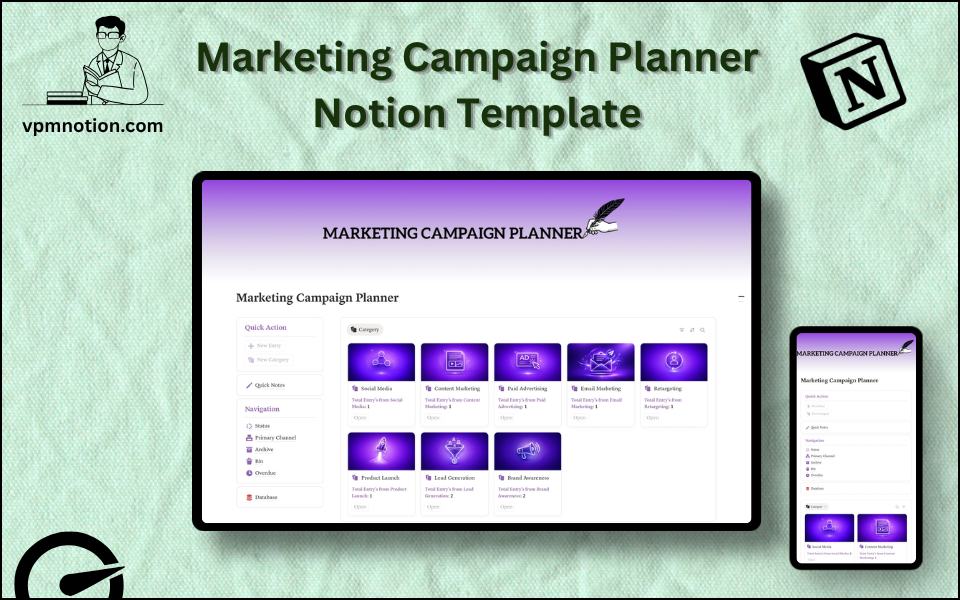
Marketing Campaign Planner Notion Template
Marketing Campaign Management & Content Planning
A structured campaign management system for marketing teams and content creators to plan, execute, and review marketing campaigns across multiple channels. This template centralises campaign data, tracks execution…
One-click duplication · Works on free Notion plans · Lifetime access
Overview
A structured campaign management system for marketing teams and content creators to plan, execute, and review marketing campaigns across multiple channels. This template centralises campaign data, tracks execution status, and highlights overdue work — keeping marketing teams on schedule and on strategy.
Key Features
- Quick Action Buttons — create new campaigns or content tasks instantly
- Quick Notes Page — campaign briefs, creative direction notes, and marketing strategy memos
- Navigation Panel with filtered views:
- Status
- Primary Channel
- Archive
- Bin
- Overdue
- Dashboard Summary Database — inline view of active campaigns
- Full Campaign Database — complete records for all marketing campaigns and content initiatives
What's Inside
Dashboard Layout
Two-column layout:
- Left column: Quick Action callout, Quick Notes link, Navigation panel with 5 views, Database shortcut
- Right column: Inline summary database with active and upcoming campaigns
Databases Included
- Campaign Summary Database — active campaigns filtered by status and channel
- Full Campaign Database — all campaigns with:
- Campaign name and objective
- Primary channel (Email, Social Media, Paid Search, SEO, Events, PR, Content, etc.)
- Status (Briefing, In Production, In Review, Scheduled, Live, Completed)
- Launch date and end date
- Target audience and messaging notes
- Budget allocation
- KPIs and success metrics
- Assigned team and creative notes
Navigation Views
- Status — filters by campaign lifecycle stage
- Primary Channel — shows all campaigns running on a specific channel
- Archive — completed or concluded campaigns with results
- Bin — cancelled or duplicate entries
- Overdue — campaigns past their deadline that haven't been completed
Use Cases
- Planning and tracking a full-year marketing calendar with multiple campaigns
- Managing product launch campaigns with multi-channel coordination
- Tracking content marketing series (blog posts, email newsletters, video series)
- Running paid advertising campaigns with budget tracking and performance notes
- Coordinating seasonal promotions across social media, email, and website
- Building a campaign archive with results for marketing performance reviews
Why You'll Love It
- Overdue view proactively surfaces campaigns that have missed deadlines
- Primary Channel filter allows channel-specific reviews (Social, Email, Paid, SEO, Events, etc.)
- Status tracking keeps campaigns moving from brief to launch without tasks falling through cracks
- Works across campaign types — product launches, seasonal promotions, content series, or ad campaigns
- Archive preserves campaign performance records for future planning reference
- Clean dashboard makes it easy to run weekly marketing planning meetings
Benefits
- Deadline Awareness — Overdue view ensures no campaigns go unnoticed past their launch date
- Channel Strategy — Primary Channel view supports focused, channel-specific campaign reviews
- Full Visibility — all campaigns in one place replaces scattered spreadsheets and briefs
- Performance History — archived campaigns with results inform future planning
- Team Alignment — shared workspace keeps all stakeholders on the same page
Who It's For
- Marketing Managers overseeing multiple campaign initiatives simultaneously
- Content Marketers planning editorial calendars and content series
- Digital Marketing Teams managing multi-channel campaigns
- Growth Marketers running experimental campaigns across channels
- Small business owners organising their own marketing activities
- Marketing Agencies tracking client campaign deliverables
How It Works
- Create a Campaign — use Quick Action to add a new campaign with name and objective
- Set Channel and Dates — assign the primary channel, launch date, and end date
- Write the Brief — use Quick Notes for campaign strategy, messaging, and creative direction
- Set Status to In Production — update as the creative and content work begins
- Move to Review — once production is complete, set status to "In Review"
- Schedule for Launch — approved campaigns move to "Scheduled" status
- Monitor Live Campaigns — check the Active status view for running campaigns
- Check Overdue View — use daily to catch any campaigns that have missed their deadline
- Archive with Results — after completion, record performance metrics and archive the campaign
Frequently Asked Questions
What is the Marketing Campaign Planner Notion template?
Marketing Campaign Management & Content Planning. A structured campaign management system for marketing teams and content creators to plan, execute, and review marketing campaigns across multiple channels.
Is the Marketing Campaign Planner template free?
Yes — Marketing Campaign Planner is completely free. Add it to your cart for $0 and duplicate it straight into your own Notion workspace in one click.
Who is Marketing Campaign Planner best for?
It's designed for Marketing Managers overseeing multiple campaign initiatives simultaneously; Content Marketers planning editorial calendars and content series; Digital Marketing Teams managing multi-channel campaigns.
What's included in Marketing Campaign Planner?
Key components include Campaign Summary Database, Full Campaign Database, Campaign name and objective, Primary channel (Email, Social Media, Paid Search, SEO, Events, PR, Content, etc.), Status (Briefing, In Production, In Review, Scheduled, Live, Completed).
Does Marketing Campaign Planner work on the free Notion plan and on mobile?
Yes. It works on both free and paid Notion plans and is fully usable on desktop, tablet, and the Notion mobile app. Just duplicate it to your workspace and start straight away.
Summary
The Marketing Campaign Planner Notion template is the campaign management backbone every marketing team needs. With channel-specific filtering, overdue tracking, and a full campaign lifecycle from brief to archive, it keeps marketing initiatives moving on schedule while preserving performance data for future reference. Whether running one campaign or fifty, this template keeps marketing operations clear, organised, and proactive.
No cost — yours in one click
16 sold
Get it Free- Instant Notion duplication
- Desktop, tablet & mobile
- Beginner-friendly setup
Get Marketing Campaign Planner today
The Marketing Campaign Planner Notion template is the campaign management backbone every marketing team needs. With channel-specific filtering, overdue…
Get it Free