 Business
Agency Management System Notion Template
Creative & Digital Agency Client Management
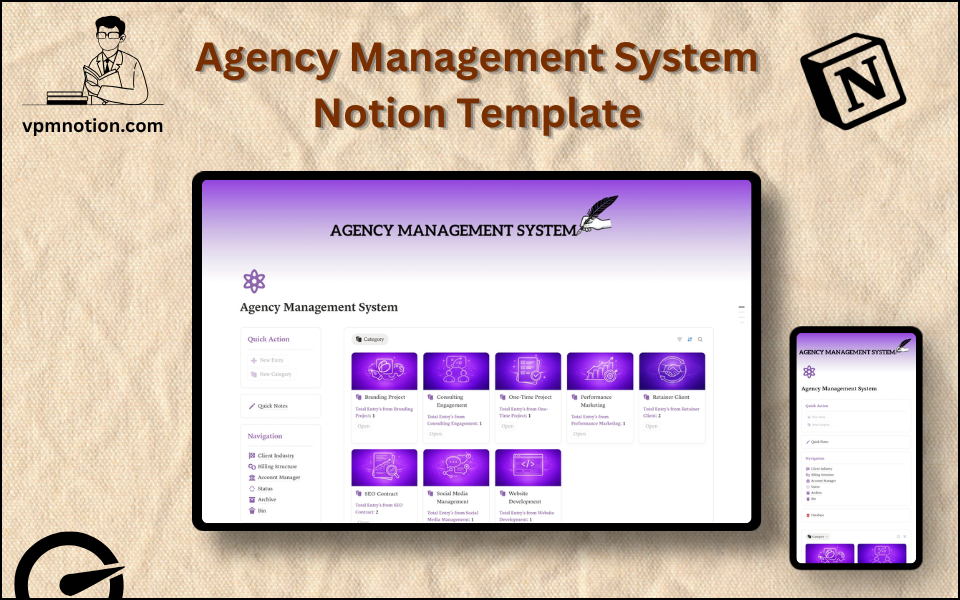
A comprehensive management system for agencies to track client accounts, manage billing structures, assign account managers, and oversee the full lifecycle of agency-client relationships. This template gives agency…
One-click duplication · Works on free Notion plans · Lifetime access
Overview
A comprehensive management system for agencies to track client accounts, manage billing structures, assign account managers, and oversee the full lifecycle of agency-client relationships. This template gives agency owners and account managers the operational clarity needed to run multiple client accounts efficiently.
Key Features
- Quick Action Buttons — add new client accounts or update existing records quickly
- Quick Notes Page — client meeting notes, account strategy memos, and internal observations
- Navigation Panel with filtered views:
- Client Industry
- Billing Structure
- Account Manager
- Status
- Archive
- Bin
- Dashboard Summary Database — inline view of active client accounts
- Full Agency Database — complete records for all agency client relationships
What's Inside
Dashboard Layout
Two-column layout:
- Left column: Quick Action callout, Quick Notes link, Navigation panel with 6 views, Database shortcut
- Right column: Inline summary database with active client accounts
Databases Included
- Agency Overview Database — active accounts filtered by status
- Full Client Database — all client records with:
- Client / company name
- Industry (Tech, E-commerce, Healthcare, Finance, Retail, Real Estate, etc.)
- Billing structure (Monthly Retainer, Project-Based, Hourly, Performance-Based)
- Account Manager
- Status (Prospecting, Onboarding, Active, At Risk, Paused, Churned)
- Contract start/end dates
- Monthly retainer value or project budget
- Notes and deliverables summary
Navigation Views
- Client Industry — segments the portfolio by sector
- Billing Structure — groups accounts by revenue model for financial planning
- Account Manager — shows each AM their full client roster
- Status — filters by account lifecycle stage
- Archive — completed or churned accounts with full history
- Bin — duplicate or invalid entries
Use Cases
- Managing a portfolio of 10–100+ client accounts across multiple account managers
- Tracking retainer and project-based revenue for monthly agency financial forecasting
- Onboarding new clients with a structured status progression
- Identifying at-risk accounts before they churn using status monitoring
- Running monthly agency revenue reviews by billing structure
- Building client case studies by accessing historical account data from Archive
Why You'll Love It
- Billing Structure filtering separates retainer, project-based, and hourly clients for revenue planning
- Account Manager view allows each team member to quickly see their client portfolio
- Client Industry filter helps agency leadership understand vertical specialisation and diversification
- Status tracking monitors client account health — from onboarding to at risk to active
- Archive preserves historical client data for case studies, testimonials, and win/loss analysis
- Gives agency principals a bird's-eye view of the entire client base in one workspace
Benefits
- Revenue Clarity — billing structure view enables fast revenue forecasting
- Portfolio Visibility — agency leaders see all clients and their status in one dashboard
- Account Manager Accountability — each AM's portfolio is clearly visible and assigned
- Industry Intelligence — vertical diversification and concentration visible at a glance
- Client History — archived accounts preserve institutional knowledge for business development
Who It's For
- Agency Owners and Directors overseeing the full client portfolio
- Account Managers managing day-to-day client relationships
- Business Development Managers tracking new client pipeline
- Operations Managers at creative, digital, or PR agencies
- Freelance Agency Operators managing a growing roster of clients
How It Works
- Add a New Client — use Quick Action to create a client record when a deal closes
- Set Properties — assign industry, billing structure, account manager, and initial status
- Begin Onboarding — update status to "Onboarding" and log first-week actions in Quick Notes
- Move to Active — once onboarded, update status to reflect the active relationship
- Monitor Account Health — regularly review Status view for any accounts moving to "At Risk"
- Account Manager View — each AM uses this view for their weekly account review
- Revenue Review — use Billing Structure view for monthly revenue and forecast meetings
- Archive Completed Accounts — at project close or churn, archive with results and notes intact
Frequently Asked Questions
What is the Agency Management System Notion template?
Creative & Digital Agency Client Management. A comprehensive management system for agencies to track client accounts, manage billing structures, assign account managers, and oversee the full lifecycle of agency-client relationships.
How much does Agency Management System cost?
Agency Management System is a premium Notion template available for a one-time payment of $7 — no subscription. After checkout you can duplicate it into your Notion workspace and own it forever.
Who is Agency Management System best for?
It's designed for Agency Owners and Directors overseeing the full client portfolio; Account Managers managing day-to-day client relationships; Business Development Managers tracking new client pipeline.
What's included in Agency Management System?
Key components include Agency Overview Database, Full Client Database, Client / company name, Industry (Tech, E-commerce, Healthcare, Finance, Retail, Real Estate, etc.), Billing structure (Monthly Retainer, Project-Based, Hourly, Performance-Based).
Does Agency Management System work on the free Notion plan and on mobile?
Yes. It works on both free and paid Notion plans and is fully usable on desktop, tablet, and the Notion mobile app. Just duplicate it to your workspace and start straight away.
Summary
The Agency Management System Notion template is the operational hub that keeps agency relationships, revenue, and accountability in clear view. With billing structure visibility, account manager assignment, and industry segmentation, agency teams can manage more clients with less confusion — and leadership always has a clear picture of portfolio health. A practical, lightweight alternative to expensive agency management platforms.
One-time payment · lifetime access
Get Template — $7- Instant Notion duplication
- Desktop, tablet & mobile
- Beginner-friendly setup
Related templates
Get Agency Management System today
The Agency Management System Notion template is the operational hub that keeps agency relationships, revenue, and accountability in clear view. With billing…
Get Template — $7